Telegram
One bot, all your agents
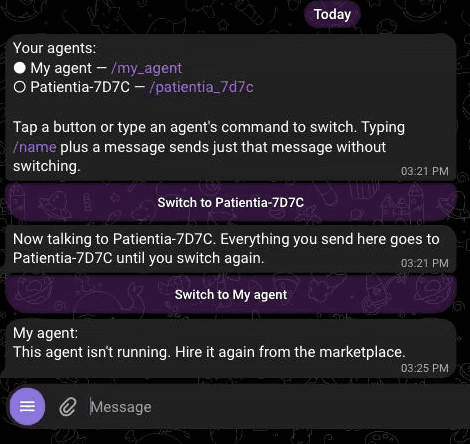
You talk to every agent through one Telegram bot. Your chat always has one active agent — and switching happens right inside Telegram, with a tap.
How many times do I set this up? Once. Ever. Connect Telegram one time and you are done forever — every agent you have today, and every agent you create later, answers in this same chat. There is no per-agent step.
Step 1
Connect once
On any agent's page, tap Connect Telegram. It opens the bot with a Start button — press it, and you're connected. That's the whole setup, and you never repeat it: every agent you hire from then on is reachable in the same chat.
Step 2
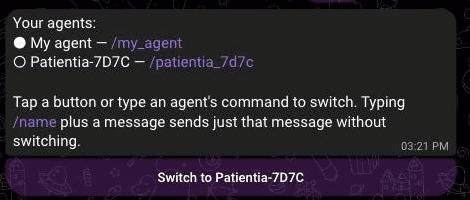
See your agents with /agents
Send /agentsany time. The filled dot marks who's listening right now, and every other agent gets its own switch button.
Step 3
Switch with a tap
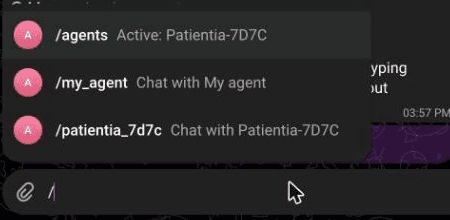
Tap a button — or type / and pick from Telegram's menu. The top row always shows who's active; below it, one command per agent.
Every switch is confirmed loudly, with the way back one tap away:

Step 4
Ask another agent one thing
Type an agent's command plus a message — like /my_agent are you there? — and just that message goes to that agent. Your active agent stays active, and the reply comes back labeled with the sender's name:

Good to know
- New agents need no setup. Hire an agent and it simply appears in
/agentsand the/menu. - Unsure who's listening? Send
/agents— it always shows the live picture. - Typos are safe. A mistyped command gets a gentle pointer to
/agents— it never goes to the wrong agent.